Compliance Submittal
Submitting Compliance Documents
Follow these steps to submit Compliance documents:
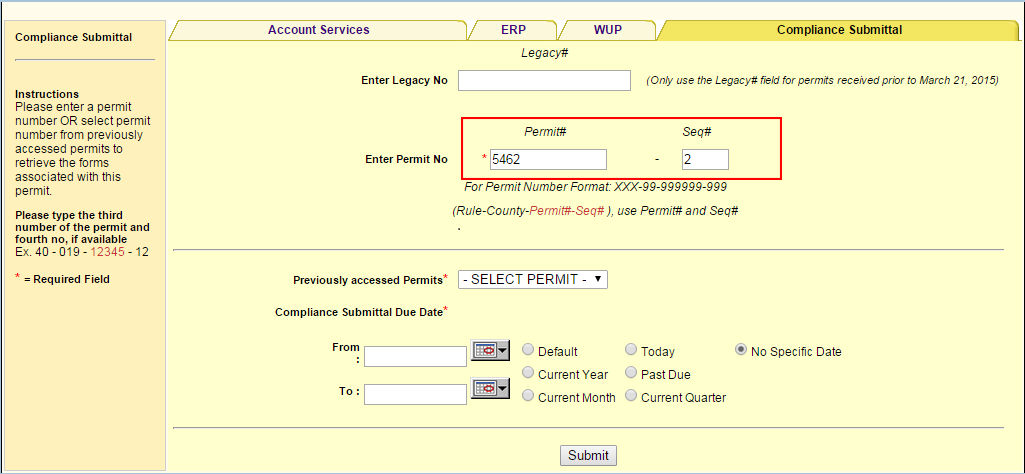
Step 1: Enter permit number
a. Click on the Compliance Submittal tab.

b. Enter the Permit Number and Sequence Number and click Submit.
Step 2: Select the submittal form
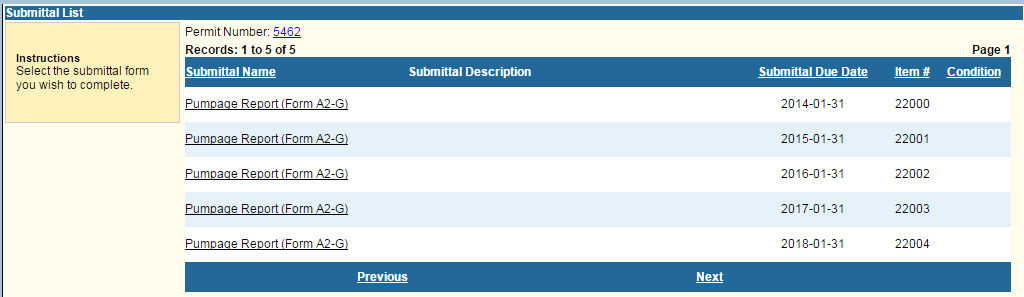
Select the submittal form you wish to complete by clicking on the link under the Submittal Name column.
Step 3: Complete the required information
The submittal type selected determines the form that will be displayed for completion.
Step 4: View your confirmation and click Continue
After completing the compliance form(s) and clicking Submit,
a. You will receive a Thank You page confirming receipt of your changes.
b. Click Continue to return to the Home Page.
Step 5: View your confirmation e-mail
You'll receive an e-mail, confirming your compliance submittal.
Related Help Topics
Contact Customer Support
 If you're looking for more help or have
a question to ask, please contact
us.
If you're looking for more help or have
a question to ask, please contact
us.